
Recommended Hardware and OS
Prequisites: You have already set up Validator Node and Storage Node.
CPU | 4 Cores |
Memory | 16 GB RAM |
Storage | 500GB/1TB NVMe SSD |
Bandwidth | 500mbps |
OS | Linux |
Storage KV Node Installation
1. Install Dependencies
shellsudo apt-get update
sudo apt-get install git cargo clang cmake build-essential -y
2. Install Rustup
shellcurl --proto '=https' --tlsv1.2 -sSf https://sh.rustup.rs | sh
Just press Enter to choose default installation. Then:
shell. "$HOME/.cargo/env"
NOTE: IF IT SHOWS THAT RUSTUP HAS ALREADY BEEN INSTALLED
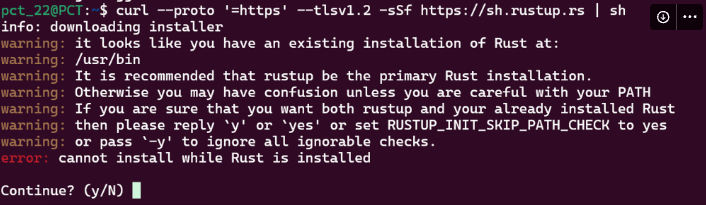
CHOOSE “NO” AND THEN REMOVE IT WITH:
shellsudo rm /usr/bin/rustc
sudo rm /usr/bin/cargo
NOW YOU CAN INSTALL RUSTUP LIKE ABOVE.
3. Install GO
shellcd $HOME && \
ver="1.22.0" && \
sudo rm -rf /usr/local/go && \
sudo curl -fsSL "https://golang.org/dl/go$ver.linux-amd64.tar.gz" | sudo tar -C /usr/local -xzf - && \
grep -qxF 'export PATH=$PATH:/usr/local/go/bin:$HOME/go/bin' ~/.bash_profile || echo 'export PATH=$PATH:/usr/local/go/bin:$HOME/go/bin' >> ~/.bash_profile && \
source ~/.bash_profile && \
go version
4. Build binary
shellcd $HOME
git clone -b v1.1.0-testnet https://github.com/0glabs/0g-storage-kv.git
cd 0g-storage-kv
git submodule update --init
cargo build --release
sudo mv "$HOME/0g-storage-kv/target/release/zgs_kv" /usr/local/bin
Note: This step can take up to 30 minutes, just let it run.

5. Create DB & KV-DB Directory
shellmkdir -p "$HOME/0g-storage-kv/db" "$HOME/0g-storage-kv/kv-db"
6. Create Config File
shellcp $HOME/0g-storage-kv/run/config_example.toml $HOME/0g-storage-kv/run/config.toml
7. Set Up Environment Variables
Run the command below and input your storage node IP and port in this format
http://x.x.x.x:5678.shellread -p "Enter your storage node IP and port for zgs_node_urls configuration: " ZGS_NODE_URLS
Run the command below and input your validator node IP and port in this format
http://x.x.x.x:8545.shellread -p "Enter your validator node IP and port for blockchain_rpc_endpoint configuration: " BLOCKCHAIN_RPC_ENDPOINT
NOTE: Make sure the validator RPC that you are going to use has block 401178 before you run Storage KV by running the command below. Check it using:
shellcurl -X POST http://yourvalidatorip:port -H "Content-Type: application/json" -d '{"jsonrpc":"2.0","method":"eth_getBlockByNumber","params":["0x61B8A",false],"id":1}'
Now set up all environment variables:
shellecho 'export DB_DIR="$HOME/0g-storage-kv/db"' >> ~/.bash_profile

echo 'export ZGSKV_DB_DIR="$HOME/0g-storage-kv/kv-db"' >> ~/.bash_profile

echo 'export ZGS_NODE_URLS="'$ZGS_NODE_URLS'"' >> ~/.bash_profile

echo 'export ZGSKV_CONFIG_FILE="$HOME/0g-storage-kv/run/config.toml"' >> ~/.bash_profile

echo 'export ZGSKV_LOG_CONFIG_FILE="$HOME/0g-storage-kv/run/log_config"' >> ~/.bash_profile

echo 'export BLOCKCHAIN_RPC_ENDPOINT="'$BLOCKCHAIN_RPC_ENDPOINT'"' >> ~/.bash_profile

source ~/.bash_profile
8. Update Config File
shellsed -i "s|^\s*#\?\s*db_dir\s*=.*|db_dir = \"$DB_DIR\"|" "$ZGSKV_CONFIG_FILE"

sed -i "s|^\s*#\?\s*kv_db_dir\s*=.*|kv_db_dir = \"$ZGSKV_DB_DIR\"|" "$ZGSKV_CONFIG_FILE"

sed -i 's|^\s*#\?\s*rpc_listen_address\s*=.*|rpc_listen_address = "0.0.0.0:6789"|' "$ZGSKV_CONFIG_FILE"

sed -i "s|^\s*#\?\s*zgs_node_urls\s*=.*|zgs_node_urls = \"$ZGS_NODE_URLS\"|" "$ZGSKV_CONFIG_FILE"

sed -i "s|^\s*#\?\s*log_config_file\s*=.*|log_config_file = \"$ZGSKV_LOG_CONFIG_FILE\"|" "$ZGSKV_CONFIG_FILE"

sed -i "s|^\s*#\?\s*blockchain_rpc_endpoint\s*=.*|blockchain_rpc_endpoint = \"$BLOCKCHAIN_RPC_ENDPOINT\"|" "$ZGSKV_CONFIG_FILE"

sed -i 's|^\s*#\?\s*log_contract_address\s*=.*|log_contract_address = "0xB7e39604f47c0e4a6Ad092a281c1A8429c2440d3"|' "$ZGSKV_CONFIG_FILE"

sed -i 's|^\s*#\?\s*log_sync_start_block_number\s*=.*|log_sync_start_block_number = 401178|' "$ZGSKV_CONFIG_FILE"
9. Create Service File
Create a service file to run the storage kv node in the background.
shellsudo tee /etc/systemd/system/zgskv.service > /dev/null <<EOF
[Unit]
Description=0G Storage KV Node
After=network.target

[Service]
User=$USERType=simple
ExecStart=/usr/local/bin/zgs_kv --config $HOME/0g-storage-kv/run/config.toml
Restart=on-failure
LimitNOFILE=65535

[Install]
WantedBy=multi-user.target
EOFclear
10. Start Storage Node
shellsudo systemctl daemon-reload && \
sudo systemctl enable zgskv && \
sudo systemctl start zgskv && \
sudo systemctl status zgskv
Other Useful Commands
- Check Log
shellsudo journalctl -u zgskv -f -o cat
- Restart the Node
shellsudo systemctl restart zgskv
- Stop the Node
shellsudo systemctl stop zgskv
- (WARNING) Delete the Node
shellsudo systemctl stop zgskv
sudo systemctl disable zgskv
sudo rm /etc/systemd/system/zgskv.service
sudo rm /usr/local/bin/zgs_kv
rm -rf $HOME/0g-storage-kv